
Главное меню
Навигация
Настраиваем с нуля

Цикл статей Настройка Call Manager Express CUCME с нуля:
Цикл статей Настройка Call Manager CUCM с нуля:
Comunications Apps с нуля

UCCX
- Настройка Cisco Unified Contact Center Express (UCCX) с нуля. Часть 1
- Настройка Cisco Unified Contact Center Express (UCCX) с нуля. Часть 2
- Настройка Cisco Unified Contact Center Express (UCCX) с нуля. Часть 3
- Настройка UCCX 10.x, 11.x + Cisco Finesse desktop
- Установка скрипта для записи UCCX Prompts
CUC
- Настройка Cisco Unity Connection (CUC) с нуля. Часть 1
- Настройка Cisco Unity Connection (CUC) с нуля. Часть 2
CUP
- Настройка Cisco Unified Presence (CUP) с нуля. Теория
- Настройка Cisco Unified Presence (CUP) с нуля. Практика: Начальная установка
MediaSense
Настройка комплекта Cisco CUCM Business Edition 6000
- Настройка комплекта BE6000: Введение
- Настройка комплекта BE6000: Установка CUCM 11
- Настройка комплекта BE6000: Начальная установка CUC 11
- Настройка комплекта BE6000: Немного теории CUC 11
- Настройка комплекта BE6000: Настраиваем своего автосекретаря (IVR) в CUC 11
- Настройка комплекта BE6000: правильная Архивация CUCM 11.5
- Настройка комплекта BE6000: Восстановление CUCM 11.5 из архива
- Настройка комплекта BE6000: устанавливаем лицензии для телефонов CUCM 11.5
- Настройка комплекта BE6000: настройка конференции ad hoc CUCM 11.5
- Настройка комплекта BE6000: настройка конференции meet-me CUCM 11.5
- Настройка комплекта BE6000: настройка мониторинга комплекса CUCM 11.5
CUCM в крупном предприятии
- SRST. Теория (часть 1)
- SRST: Практика (Часть 2)
- Диалплан (dialplan) в крупной организации
- Cisco Device Mobility. Теория
- Cisco Device Mobility. Настройка
- Cisco Extension Mobility. Теория
- Cisco Extension Mobility. Настройка
- Call Control Discovery
- Настройка Multicast MOH Server на маршрутизаторах филиалов
- Cisco H.323 Gatekeeper. Теория
- Cisco H.323 Gatekeeper. Настройка и Практика
- Cisco H.323 Gatekeeper и Call Admission Control
- Практика подключения H.323 и SIP с использованием CUBE
- CUCM и LDAP Integration
DTMF и его настройка
Вы здесь
Настройка Cisco WLC 2504
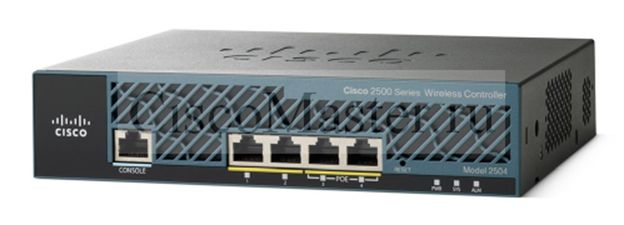
Настройку контроллера будем производить в соответствии со схемой:
Начало работы – подключаемся по серийному порту и осуществляем основную конфигурацию, чтобы затем подключиться по Http для дальнейшего конфигурирования.
CISCO SYSTEMS Embedded BIOS Version 1.0(12)12 07/23/08 10:37:30.75 Low Memory: 632 KB High Memory: 251 MB PCI Device Table. Bus Dev Func VendID DevID Class Irq 00 01 00 1022 2080 Host Bridge 00 01 02 1022 2082 Chipset En/Decrypt 11 00 0C 00 1148 4320 Ethernet 11 00 0D 00 177D 0003 Network En/Decrypt 10 00 0F 00 1022 2090 ISA Bridge 00 0F 02 1022 2092 IDE Controller 00 0F 03 1022 2093 Audio 10 00 0F 04 1022 2094 Serial Bus 9 00 0F 05 1022 2095 Serial Bus 9 Evaluating BIOS Options ... Launch BIOS Extension to setup ROMMON Cisco Systems ROMMON Version (1.0(12)12) #0: Thu Jul 24 06:25:20 MDT 2008 Platform AIR-WLC2125-K9 Launching BootLoader... Cisco Bootloader (Version 4.0.191.0) .o88b. d888888b .d8888. .o88b. .d88b. d8P Y8 `88' 88' YP d8P Y8 .8P Y8. 8P 88 `8bo. 8P 88 88 8b 88 `Y8b. 8b 88 88 Y8b d8 .88. db 8D Y8b d8 `8b d8' `Y88P' Y888888P `8888Y' `Y88P' `Y88P' Booting Primary Image... Pressnow for additional boot options... Detecting hardware . . . . Ђ Cryptographic library self-test....passed! XML config selected Validating XML configuration Cisco is a trademark of Cisco Systems, Inc. Software Copyright Cisco Systems, Inc. All rights reserved. Cisco AireOS Version 5.2.193.0 Initializing OS Services: ok Initializing Serial Services: ok Initializing Network Services: ok Error mounting license storage (6) !! Initializing Licensing Services: ok Starting ARP Services: ok Starting Trap Manager: ok Starting Network Interface Management Services: ok Starting System Services: ok Starting FIPS Features: ok : Not enabled Starting Fast Path Hardware Acceleration: ok Starting Switching Services: ok Starting QoS Services: ok Starting Policy Manager: ok Starting Data Transport Link Layer: ok Starting Access Control List Services: ok Starting System Interfaces: ok Starting Client Troubleshooting Service: ok Starting Management Frame Protection: ok Starting LWAPP: ok Starting CAPWAP: ok Starting Certificate Database: ok Starting VPN Services: ok Starting Security Services: ok Starting Policy Manager: ok Starting Authentication Engine: ok Starting Mobility Management: ok Starting LOCP: ok Starting Virtual AP Services: ok Starting AireWave Director: ok Starting Network Time Services: ok Starting Cisco Discovery Protocol: ok Starting Broadcast Services: ok Starting Power Over Ethernet Services: ok Starting Logging Services: ok Starting DHCP Server: ok Starting IDS Signature Manager: ok Starting RFID Tag Tracking: ok Starting Mesh Services: ok Starting TSM: ok Starting CIDS Services: ok Starting Ethernet-over-IP: ok Starting DTLS server: enabled in CAPWAP Starting FMC HS: ok Starting WIPS: ok Starting SSHPM LSC PROV LIST: ok Starting Management Services: Web Server: ok CLI: ok Secure Web: Web Authentication Certificate not found (error). If you cannot access management interface via HTTPS please reconfigure Virtual Interface. (Cisco Controller) Welcome to the Cisco Wizard Configuration Tool Use the '-' character to backup Would you like to terminate autoinstall? [yes]: AUTO-INSTALL: starting now... cisco2100 Invalid response Would you like to terminate autoinstall? [yes]: no *** autoinstall must be terminated in order to run the configuration wizard. Would you like to terminate autoinstall? [yes]: yes System Name [Cisco_3d:d3:00] (31 characters max): AUTO-INSTALL: no interfaces registered. AUTO-INSTALL: process terminated -- no configuration loaded cisco2100 Enter Administrative User Name (24 characters max): Cisco Enter Administrative Password (24 characters max): ******* Re-enter Administrative Password : ******* Management Interface IP Address: 10.10.41.2 Management Interface Netmask: 255.255.255.0 Management Interface Default Router: 10.10.41.1 Management Interface VLAN Identifier (0 = untagged): 109 Management Interface Port Num [1 to 8]: 1 Management Interface DHCP Server IP Address: Invalid response Management Interface DHCP Server IP Address: 10.10.47.11 Virtual Gateway IP Address: 1.1.1.1 Mobility/RF Group Name: Invalid response Mobility/RF Group Name: mobil Network Name (SSID): priemka Allow Static IP Addresses [YES][no]: no Configure a RADIUS Server now? [YES][no]: no Warning! The default WLAN security policy requires a RADIUS server. Please see documentation for more details. Enter Country Code list (enter 'help' for a list of countries) [US]: RU Global Public Safety State: Already configured, Configuring Local States... Enable 802.11b Network [YES][no]: yes Enable 802.11a Network [YES][no]: yes Enable 802.11g Network [YES][no]: yes Enable Auto-RF [YES][no]: yes Configure a NTP server now? [YES][no]: no Configure the system time now? [YES][no]: yes Enter the date in MM/DD/YY format: 02/24/2010 Invalid response Enter the date in MM/DD/YY format: 02/24/10 Enter the time in HH:MM:SS format: 13.44.30 Invalid response Enter the time in HH:MM:SS format: 13.44.30[D[D[D Invalid response Enter the time in HH:MM:SS format: 13:44:30 Configuration correct? If yes, system will save it and reset. [yes][NO]: yes
Смысл данной операции – задать management interface, т.е. интерфейс котрый используется для управления.
После выполнения данных операций мы уже сможем подключаться и осуществлять дальнейшее управление с использованием Web интерфейса.
Посмотрим настройки интерфейса management:
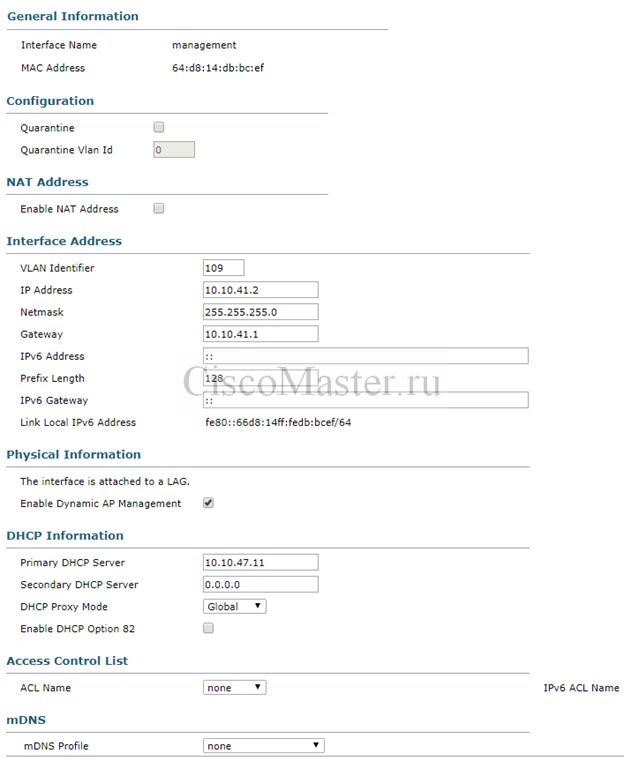
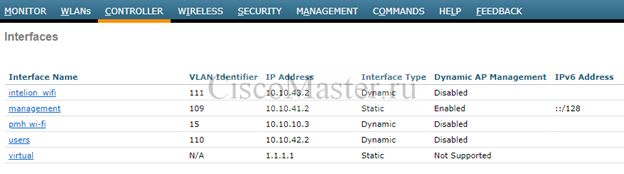
Немного теории Management interface
Management interface – Интерфейс для управления.
смотрит в сторону switched network, т.е. там где расположены AP, юзера.
Предназначен для подключения к контроллеру для администрирования а также AAA серверов.
Management traffic состоит из протоколов типа HTTPS, SSH, SNMP, NTP, TFTP. Также туннель между WLC и AP - CAPWAP строится также на management interface.
IP подсеть для администрирования как правило отдельная и совпадает с подсетью в которой находятся сами точки доступа.
Порт от контроллера на свитч является транковым.
Немного теории virtual interface
Virtual interface используется для некоторых операций с клиентом.
Например с помощью него производится DHCP relay, и с точки зрения клиента DHCP сервер будет выглядеть с IP адресом от virtual interface.
Поскольку virtual interface используется только для специфичных целей, рекомендуется дать ему nonroutable адрес типа 10.1.1.1 или 192.168.1.1. Часто ему дают адрес 1.1.1.1 в принципе это также верно.
Немного теории dynamic interface
Каждый динамический интерфейс привязан к своему VLAN. Только один интерфейс может быть привязан к определенному VLAN.
Динамические интерфейсы сделаны для того чтобы была возможность привязывать отдельные WLAN и их клиентов к различным IP подсетям.
Поскольку dynamic interface привязывается к определённому VLAN, то и адресация этого интфейса должна соответствовать адресации этого VLAN.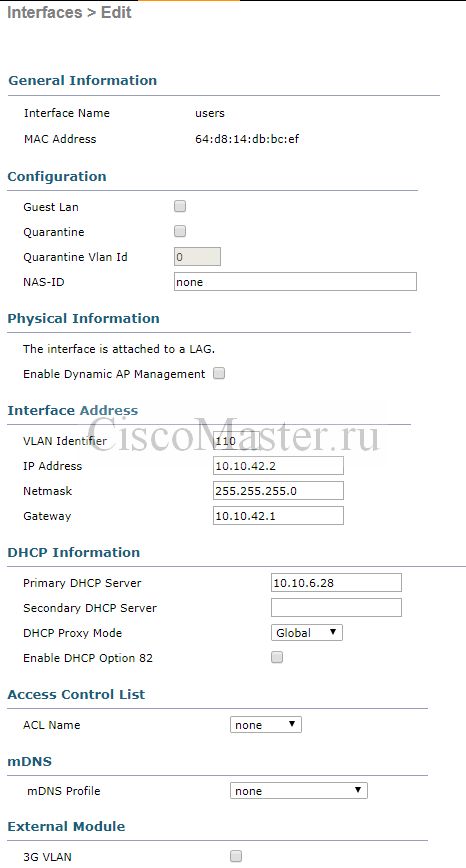
Немного теории ports and interfaces
С точки зрения контроллера ports – это физическая дыра, куда подключаются провода.
Динамические интерфейсы же виртуальны, и сделаны для того, чтобы была возможность привязывать отдельные WLAN и их клиентов к различным IP подсетям.
Интерфейс также привязан к своему физическому порту. Как только мы привяжем какой либо интерфейс к физ порту, - этот порт станет транковым.
Мы можем несколько интерфейсов привязать к одному порту, тогда все эти VLAN-ы пойдут через единственный порт.
Можно также определенные интерфейсы пустить по своему порту. Тогда на свитче этот порт также нужно будет сделать транковым.
Также мы можем объединить несколько портов в LAG: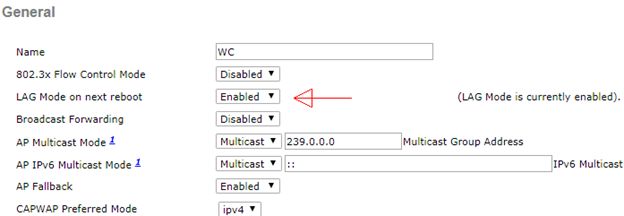
В этом случае и со стороны коммутатора необходимо настроить агрегирование, как это показано на схеме.
Интерфейсы же в этом случае уже нельзя будет привязать к какому то порту:
Немного теории DHCP
Если мы хотим использовать DHCP сервер «за контроллером» - нам необходимо указать адрес этого сервера в свойствах интерфейса как Primary DHCP Server. В этом случае будет осуществляться DHCP Proxy.
При этом можно выставить DHCP Proxy Mode:
Global – будет включено в соответствии с глобальными настройками: Controller > Advanced > DHCP
Enabled
Disabled
Если функцию DHCP сервера играет сам контроллер, можно оставить нули.
Немного best practices
Прятать SSID для повышения безопасности нет никакого смысла, напротив, некоторые устройства не могут нормально работать при отсутствиии SSID Beacons.
Несмотря на то, что 2504 поддерживает до 16 WLANs, плодить их большое количество не рекомендуется. Beacons по умолчанию высылаются раз в 100мс, и при большом количестве WLANs, служебная информация будет реально переполнять эфир.
Лучшая практика – 3-5 активных WLANs.
Обновление ПО
- Делаем резервную копию конфигурации WLC.
Commands > Upload File
-
Загружаем с сайта cisco.com файлы на наш комп:
Base Install image - AIR-CT2500-K9-8-2-166-0.aes
Supplementary AP Bundle image - нам не нужен, поскольку у нас нет AP типов AP802,AP803,AP1530, AP1550 , AP1570 and AP1600. -
Также нам необходимо загрузить Field Upgrade Software (FUS), которая необходима для обновления компонент типа bootloader, field recovery image, FPGA/MCU.
В нашем случае это файл AIR-CT2500-K9-2-0-0-0-FUS.aes
Текущую версию FUS можно понять из команды: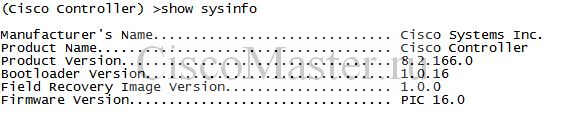
В нашем случае Bootloader version 1.0.16, а должен быть 1.0.20. -
Устанавливаем FUS:
Commands > Download File
Циска рекомендует подгружать через TFTP. Подсовываем файл AIR-CT2500-K9-2-0-0-0-FUS.aes
Система будет довольно долго обновляться, весь процесс займет примерно 30мин.
Источник: https://www.cisco.com/c/en/us/td/docs/wireless/controller/release/notes/... -
После успешной установки FUS устанавливаем Base Install image - AIR-CT2500-K9-8-2-166-0.aes:
Commands > Download File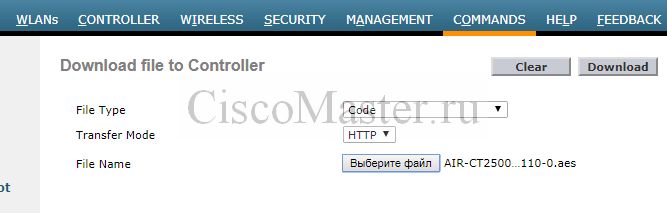
- После загрузки ребутаем
Просмотр статистики клиента в реальном времени
Это можно сделать через SSH, нам необходимо знать MAC клиента:
(Cisco Controller) >show client stats d0:e1:40:c2:2a:9c
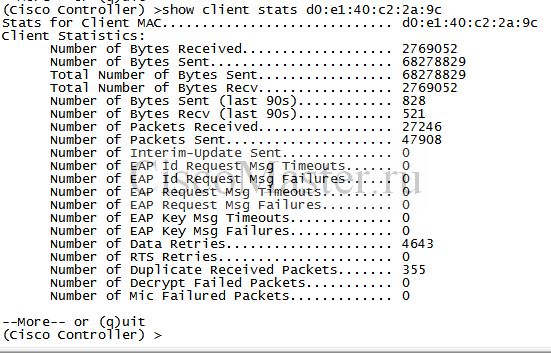
Здесь из полезного можно выделить следующее:
Client Statistics:
.......................................................
      Number of Bytes Sent (last 90s)............ 153457
      Number of Bytes Recv (last 90s)............ 73944
Определяет активность клиента.
Nearby AP Statistics:
      ap504(slot 0)
        antenna0: 690 secs ago................... -48 dBm
        antenna1: 690 secs ago................... -48 dBm
Определяем AP и уровень сигнала.
-40 _-60dBm - хорошо
-60 _ -80 - приемлемо
-80 _ .... - плохо
Просмотр дебага клиента в реальном времени
Чтобы посмотреть подробную информацию client association log:
debug client e4:46:da:e9:2f:fa
На Cisco.com можно воспользоваться анализатором дебага:
Wireless Debug analyzer
https://cway.cisco.com/tools/WirelessDebugAnalyzer/
Пример анализа роуминга клиента с использованием Wireless Debug analyzer
Сlient has roamed 3 times and all of them have been successful. That means that during the whole time the client has remained in RUN state and had not been disconnected from the APs/WLC.
Attempt 1:
Aug 31 11:03:55.923 *apfMsConnTask_5     Client roamed to AP/BSSID BSSID 2c:5a:0f:b4:b8:46 AP ap508
Aug 31 11:03:55.925 *apfMsConnTask_5     The WLC/AP has found from client association request Information Element that claims PMKID Caching support
Aug 31 11:03:55.925 *apfMsConnTask_5     The Reassociation Request from the client comes with 0 PMKID
Aug 31 11:03:55.925 *apfMsConnTask_5     Client is entering the 802.1x or PSK Authentication state
Aug 31 11:03:55.926 *apfMsConnTask_5     WLC/AP is sending an Association Response to the client with status code 0 = Successful association
Aug 31 11:03:55.937 *Dot1x_NW_MsgTask_3 4-Way PTK Handshake, Sending M1
Aug 31 11:03:55.947 *Dot1x_NW_MsgTask_3 4-Way PTK Handshake, Received M2
Aug 31 11:03:55.948 *Dot1x_NW_MsgTask_3 4-Way PTK Handshake, Sending M3
Aug 31 11:03:55.957 *Dot1x_NW_MsgTask_3 4-Way PTK Handshake, Received M4
Aug 31 11:03:55.958 *Dot1x_NW_MsgTask_3 Client has completed PSK Dot1x or WEP authentication phase
Aug 31 11:03:55.958 *Dot1x_NW_MsgTask_3 Client has entered RUN state
Attempt 2:
Aug 31 11:04:02.586 *apfMsConnTask_0     Client roamed to AP/BSSID BSSID 2c:5a:0f:38:d9:89 AP ap504
Aug 31 11:04:02.587 *apfMsConnTask_0     The WLC/AP has found from client association request Information Element that claims PMKID Caching support
Aug 31 11:04:02.587 *apfMsConnTask_0     The Reassociation Request from the client comes with 0 PMKID
Aug 31 11:04:02.588 *apfMsConnTask_0     Client is entering the 802.1x or PSK Authentication state
Aug 31 11:04:02.588 *apfMsConnTask_0     WLC/AP is sending an Association Response to the client with status code 0 = Successful association
Aug 31 11:04:02.599 *Dot1x_NW_MsgTask_3 4-Way PTK Handshake, Sending M1
Aug 31 11:04:02.613 *Dot1x_NW_MsgTask_3 4-Way PTK Handshake, Received M2
Aug 31 11:04:02.614 *Dot1x_NW_MsgTask_3 4-Way PTK Handshake, Sending M3
Aug 31 11:04:02.621 *Dot1x_NW_MsgTask_3 4-Way PTK Handshake, Received M4
Aug 31 11:04:02.621 *Dot1x_NW_MsgTask_3 Client has completed PSK Dot1x or WEP authentication phase
Aug 31 11:04:02.622 *Dot1x_NW_MsgTask_3 Client has entered RUN state
Attempt 3:
Aug 31 11:04:24.469 *apfMsConnTask_1     Client roamed to AP/BSSID BSSID 2c:5a:0f:3f:b7:86 AP ap503
Aug 31 11:04:24.470 *apfMsConnTask_1     The WLC/AP has found from client association request Information Element that claims PMKID Caching support
Aug 31 11:04:24.470 *apfMsConnTask_1     The Reassociation Request from the client comes with 0 PMKID
Aug 31 11:04:24.471 *apfMsConnTask_1     Client is entering the 802.1x or PSK Authentication state
Aug 31 11:04:24.471 *apfMsConnTask_1     WLC/AP is sending an Association Response to the client with status code 0 = Successful association
Aug 31 11:04:24.476 *Dot1x_NW_MsgTask_3 4-Way PTK Handshake, Sending M1
Aug 31 11:04:24.498 *Dot1x_NW_MsgTask_3 4-Way PTK Handshake, Received M2
Aug 31 11:04:24.499 *Dot1x_NW_MsgTask_3 4-Way PTK Handshake, Sending M3
Aug 31 11:04:24.504 *Dot1x_NW_MsgTask_3 4-Way PTK Handshake, Received M4
Aug 31 11:04:24.504 *Dot1x_NW_MsgTask_3 Client has completed PSK Dot1x or WEP authentication phase
Aug 31 11:04:24.504 *Dot1x_NW_MsgTask_3 Client has entered RUN state
Полезные команды
show interface summary
show network summary
show sysinfo
show time
save config
Посмотреть Up Time
show sysinfo
Раздел System Up Time
Посмотреть причину последнего ребута (reboot, reset)
show sysinfo
раздел "Last reset"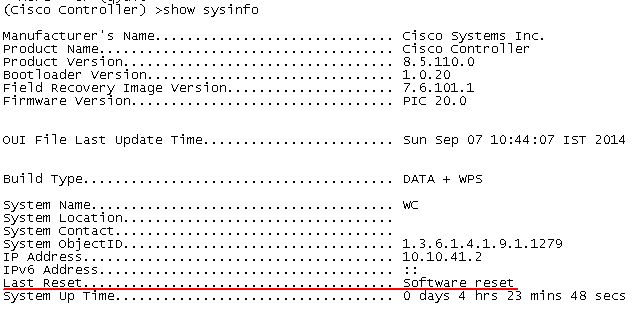
Сохранение (backup) конфигурации
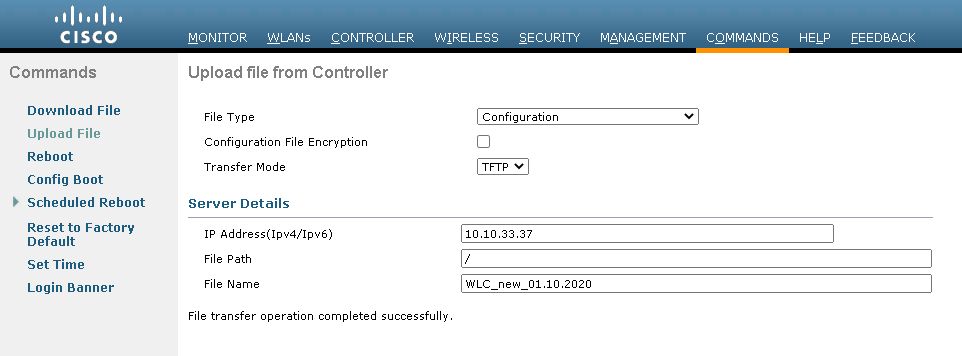
Если пропала AP
Если мы в какой-то момент недосчитались одной из AP, можно попытаться понять кто именно пропал и когда:
show ap join stats summary all
Показывает все зареганные и незареганные AP:
(Cisco Controller) >show ap join stats summary all

Number of APs.............................................. 46

Base Mac             AP EthernetMac       AP Name                 IP Address         Status
00:2c:c8:de:fc:00    00:d7:8f:9a:3f:d2    ap505@              10.10.41.16        Joined
00:2c:c8:f2:5b:80    a0:3d:6f:57:d9:ae    ap606@              10.10.41.28        Joined
00:2c:c8:fd:28:80    cc:16:7e:dc:41:8e    ap401@              10.10.41.15        Joined
18:9c:5d:6d:fa:30    78:da:6e:85:06:22    ap303                   10.10.41.113       Joined
18:9c:5d:83:45:00    78:da:6e:52:4e:82    ap404                   10.10.41.140       Joined
2c:5a:0f:1a:70:e0    08:96:ad:9d:08:2c    ap305@              10.10.41.31        Joined
2c:5a:0f:1a:71:c0    08:96:ad:9d:08:3a    ap602@              10.10.41.34        Joined
2c:5a:0f:1f:85:20    a0:3d:6f:6b:dd:84    ap202@              10.10.41.36        Not Joined
2c:5a:0f:38:d9:80    2c:d0:2d:2a:d5:14    ap504@              10.10.41.17        Joined
2c:5a:0f:38:da:00    2c:d0:2d:2a:d5:1c    ap301@              10.10.41.27        Joined
2c:5a:0f:3f:b7:80    a0:3d:6f:57:e1:6e    ap503@              10.10.41.18        Joined
2c:5a:0f:3f:b8:00    N A                  APA03D.6F57.E176        10.10.10.16        Not Joined
2c:5a:0f:40:20:20    08:96:ad:9d:0f:b0    ap604@              10.10.41.14        Joined
Более подробная инфа о отсутствующей AP:
(Cisco Controller) >show ap join stats summary 2c:5a:0f:1f:85:20

Is the AP currently connected to controller................ No
Time at which the AP joined this controller last time...... Jan 15 12:03:24.400
Type of error that occurred last........................... AP got or has been disconnected
Reason for error that occurred last........................ Number of message retransmission to the AP has reached maximum
Time at which the last join error occurred................. Jan 15 12:53:58.319
Получить доступ на AP по SSH
Доступ по SSH может понадобиться для дебага или просмотра логов.
- Wireless - Global Configuration - устанавливаем login creds
- All AP - choose AP - Advanced Tab - enable SSH
эти же настройки можно выставить на какой-то одной AP
AP перестали регистрироваться
Применяемые команды для дебага
debug capwap errors enable
debug disable-all
show auth-list
show time
Дебаг выявил ошибки:
*spamApTask5: May 03 11:20:34.778: d0:72:dc:ba:55:d2 Deleting AP 10.10.41.55 which has not been plumbed
*spamApTask5: May 03 11:20:34.778: d0:72:dc:ba:55:d2 DTLS connection was closed
*spamApTask5: May 03 11:20:34.778: d0:72:dc:ba:55:d2 Discarding non-ClientHello Handshake OR DTLS encrypted packet from  10.10.41.55:58718)since DTLS session is not established
*spamApTask5: May 03 11:20:34.778: d0:72:dc:ba:55:d2 Discarding non-ClientHello Handshake OR DTLS encrypted packet from  10.10.41.55:58718)since DTLS session is not established
*spamApTask5: May 03 11:20:34.778: d0:72:dc:ba:55:d2 Discarding non-ClientHello Handshake OR DTLS encrypted packet from  10.10.41.55:58718)since DTLS session is not established
*spamApTask5: May 03 11:20:34.778: d0:72:dc:ba:55:d2 Discarding non-ClientHello Handshake OR DTLS encrypted packet from  10.10.41.55:58718)since DTLS session is not established
*spamApTask5: May 03 11:20:34.781: d0:72:dc:ba:55:d2 Discarding non-ClientHello Handshake OR DTLS encrypted packet from  10.10.41.55:58718)since DTLS session is not established
*spamApTask1: May 03 11:20:34.781: 78:da:6e:52:4e:8f Discarding non-ClientHello Handshake OR DTLS encrypted packet from  10.10.41.52:58600)since DTLS session is not established
Это говорит об устаревании сертификаты точек доступа.
Как решение:
config ap cert-expiry-ignore mic enable
Работа с Eltex

UserGate с нуля

Security

- Cisco ISE с нуля: краткая теория (Часть 1)
- Cisco ISE с нуля: Установка ISE (Часть 2)
- Cisco ISE с нуля: Краткая теория о Authentication Policies и Authorization Policies (Часть 3)
- Cisco ISE с нуля: Wireless Authentication (Часть 4)
- Cisco ISE с нуля: Настройка Web Authentication, Guest WebAuth (Часть 5)
- Cisco ISE с нуля: настройка TACACS (часть 6)
Работа с ISE 3.2
Технологии VPN
- DMVPN и EIGRP
- DMVPN и резервный ISP
- Автопереключение между двумя провайдерами
- Подключение региональных офисов с серыми адресами по VPN
- Web VPN: подключение отовсюду
- Установка AnyConnect SSLVPN на IOS Router
- Работа с ASA Anyconnect SSL VPN HUB
- ASA и Wildcard certificate
- Настройка 3G/4G на Cisco ISR 1100 LTE 4g/3g Cellular
VoIP Voice Monitoring
VoIP Troubleshooting

- Обзор Cisco Unified Comunications System Troubleshooting
- Архивирование и восстановление Cisco Call Manager CUCM
- Поиск проблем с маршрутизацией CUCM с использованием traces
- Логирование и трекинг (trace) звонков в CUCM
- Работа с RTMT
- Полезное в RTMT
- Настройка учета звонков в CUCM
- CUCM Dialed Number Analyzer
- Полезные команды UCCX
CUCM и Факсы
Архивация и восстановление CUCM

Работа с медиа-ресурсами

SIP и Call Manager
- Часть 1 Теория
- Часть 2 Настройка SIP gateway
- Часть 3 Подключение CUCM к SIP ITSP
- Часть 6 Подключение к SIP-провайдеру
- Подключение CUCM к двум и более SIP операторам с авторизацией (sipnet + telphin). CUBE Multiple Registrars
- Подключение CUCM к SIP оператору с авторизацией по нескольким учеткам одновременно. (domru, sipnet, telphin, beeline) CUBE Multiple Registrars
- Cisco CUBE и Tenants
- Работа со "сложными" провайдерами SIP IP телефонии
Работа со стендом
- Настройка Cisco Unified Comunications с нуля. Практика01: Установка CUCM
- Настройка Cisco Unified Comunications с нуля. Практика02: Установка CUC
- Настройка Cisco Unified Comunications с нуля. Практика03: Установка CUP
- Настройка Cisco Unified Comunications с нуля. Практика04: Установка UCCX
- Настройка Cisco Unified Comunications с нуля. Практика05: Установка шлюза MGCP FXO
- Настройка Cisco Unified Comunications с нуля. Практика06: Переход в другой домен AD
- Настройка Cisco Unified Comunications с нуля. Практика07: Полное восстановление кластера CUCM 8.6 из архива
- Настройка Cisco Unified Comunications. Связка CUCM10.x_UCCX10.x_Mediasence10.x_01: Описание
- Настройка Cisco Unified Comunications. Связка CUCM10.x_UCCX10.x_Mediasence10.x_02: Установка CUCM
- Настройка Cisco Unified Comunications. Связка CUCM10.x_UCCX10.x_Mediasence10.x_03: Установка UCCX
- Настройка Cisco Unified Comunications. Связка CUCM10.x_UCCX10.x_Mediasence10.x_04: Установка Mediasense

Комментарии
Добрый день. Как раз на днях
Добрый день. Как раз на днях приобрели данный контроллер. Первые настройки прошел по вашей инструкции. Если у вас будет время, было бы интересно статьи для данного контроллера.
Добавить комментарий